[Clean Architecture] SOLID원칙 05. ISP(Interface Segregation Principle) 인터페이스 분리 원칙
클라이언트는 그들이 사용하지 않는 인터페이스에 의존해서는 안된다.
불필요한 인터페이스 요소들을 포함시키지 말라는 의미이다. 불필요한 요소들이 포함되면서 복잡해지고, 무거워짐에 따라 진작 원하는 정보를 얻을 수 없는 지경에까지 이르기도 한다. 이 문제는 클래스나 프로토콜 모두에게 영향을 줄 수 있다.
Protocol
protocol의 경우를 먼저 본다.
"터치"를 했을 때 반응을 구현해줄 didTap 메서드를 가지고 있는 GuestureProtocol을 보자.
protocol GusetureProtocol{
    func didTap()
}
이후에 더 많은 제스처들을 추가해주고싶어서 프로토콜에 추가한다면?
protocol GusetureProtocol{
    func didTap()
    func didDoubleTap()
    func didLongPress()
}
그리고 실제로 사용할 때에는 프로토콜을 채택하고 그 메서드들을 구현해주면 된다.
class SuperButton: GusetureProtocol{
    func didTap() {
        <#code#>
    }

    func didDoubleTap() {
        <#code#>
    }

    func didLongPress() {
        <#code#>
    }


}
문제는 여기서 발생한다 만약 didTap만을 지원하는 버튼을 만들고자 한다면 어떻게 해야할까? 따로 메서드를 만들지, 아니면 프로토콜을 채택하고 나머지 메서드들은 더미하게 구현해야할지 싶을거다.
하지만 이렇게 구현하는 것 자체가 ISP를 위반하는 "Fat"한 인터페이스이다. 그렇기에 필요한 기능만 골라서 사용할 수 있도록 프로토콜을 나눠서 구현해주는 방식으로 구성해야한다.
protocol TapProtocol {
    func didTap()
}

protocol DoubleTapProtocol {
    func didDoubleTap()
}

protocol LongPressProtocol {
    func didLongPress()
}

class SuperButton: TapProtocol, DoubleTapProtocol, LongPressProtocol {
    func didTap() {
        // send tap action
    }

    func didDoubleTap() {
        // send double tap action
    }

    func didLongPress() {
        // send long press action
    }
}

class PoorButton: TapProtocol {
    func didTap() {
        // send tap action
    }
}
이렇게 프로토콜마다 메서드를 하나씩 만들어주게되면, 원하는 프로토콜만 채택하여 기능을 구현할 수 있게 된다.
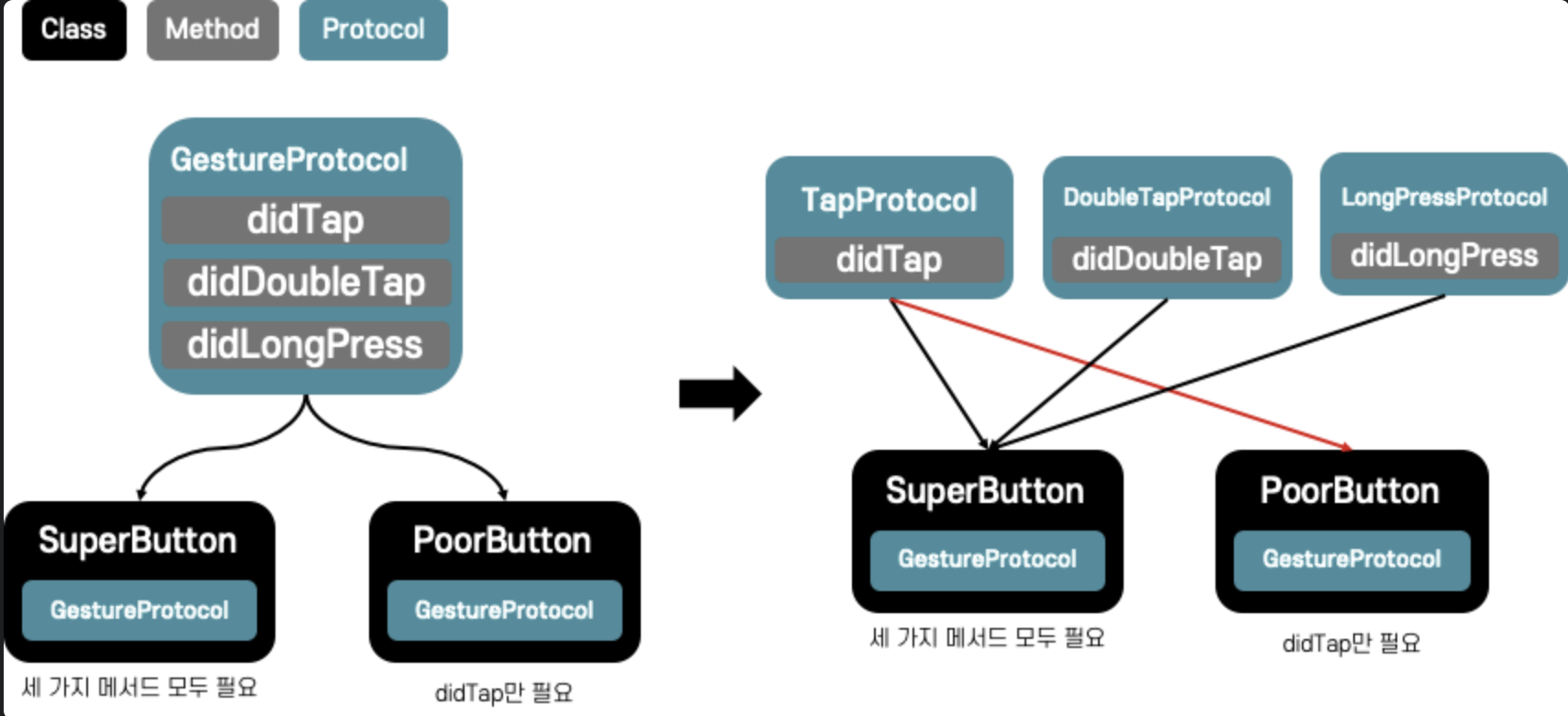
Class의 경우
영상에 대한 정보를 포함하고 있는 Video라는 클래스가 있다고 해보자.
class Video {
    var title: String = "My Video"
    var description: String = "This is a beautiful video"
    var author: String = "Marco Santarossa"
    var url: String = "https://marcosantadev.com/my_video"
    var duration: Int = 60
    var created: Date = Date()
    var update: Date = Date()
}
그리고 play라는 메서드에 비디오 정보를 넣어준다.
func play(video: Video) {
    // load the player UI
    // load the content at video.url
    // add video.title to the player UI title
    // update the player scrubber with video.duration
}
play메서드에는 title, rul, duration만 필수적인 정보이고 나머지는 굳이 받아야 할 필요가 없다.
이런 경우 또한 protocol을 정의해줌으로써 play메서드가 필요로하는 정보만 전달해주면 된다.
protocol Playable {
    var title: String { get }
    var url: String { get }
    var duration: Int { get }
}

class Video: Playable {
    var title: String = "My Video"
    var description: String = "This is a beautiful video"
    var author: String = "Marco Santarossa"
    var url: String = "https://marcosantadev.com/my_video"
    var duration: Int = 60
    var created: Date = Date()
    var update: Date = Date()
}


func play(video: Playable) {
    // load the player UI
    // load the content at video.url
    // add video.title to the player UI title
    // update the player scrubber with video.duration
}